
I Needed Two Specialists to Build This Smart Home Device in 2018. In 2025, Two Weeks.
The first build took a year and spanned electrical engineering, embedded software, and industrial design. Seven years later I did the whole thing myself with the help of Claude, ChatGPT, and Gemini.
Around 2015, companies like Google and Amazon were introducing a new category of consumer technology: the smart home assistant. Like many, I was excited about the possibilities. Our Wallace and Gromit home automation dreams were reawakened.
The devices were fun to explore, but once the novelty wore off their limitations became apparent. A great assistant finds relevant information and anticipates what you need. These devices often struggled to answer questions beyond a limited range, and were largely reactive, waiting for a command. The help they provided didn't always feel more useful or convenient than what a smartphone or a well-phrased Google search already offered. They didn't fit into daily life as naturally as we'd hoped.
All that incredible technology and innovation, and we were mostly asking a glowy hockey puck about the weather.
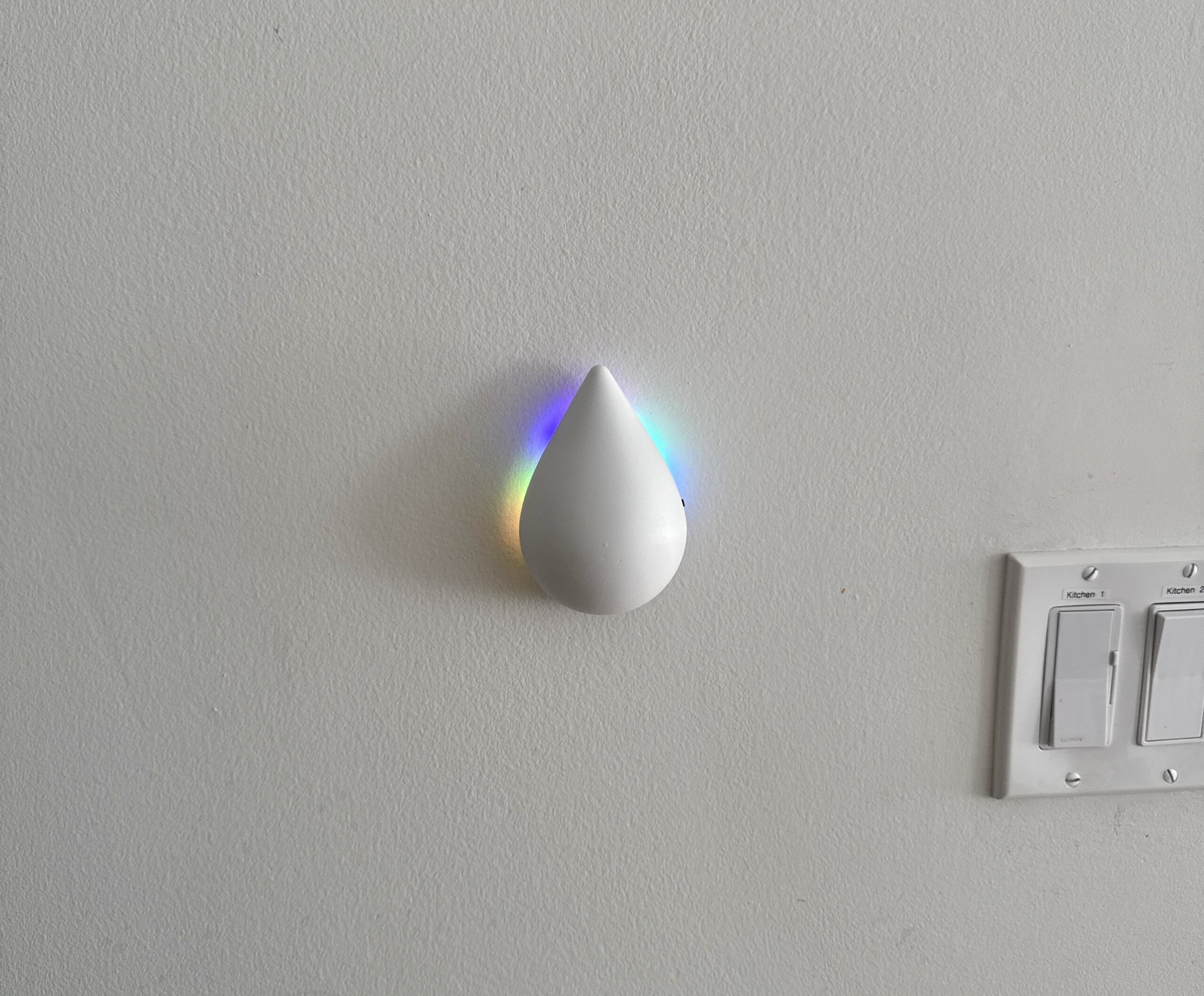
Partly as satire, and partly because I enjoy building things and exploring technology and user experience, I decided to see whether a simpler device could handle the weather use case better. It had to stand on its own, look good, and fit naturally into a daily routine, providing useful weather information at the moment it mattered. The initial goal was a simple, elegant umbrella hook that let me know whether to take the umbrella with me, without having to ask or listen to a forecast.
Ten lights, arranged like a clock
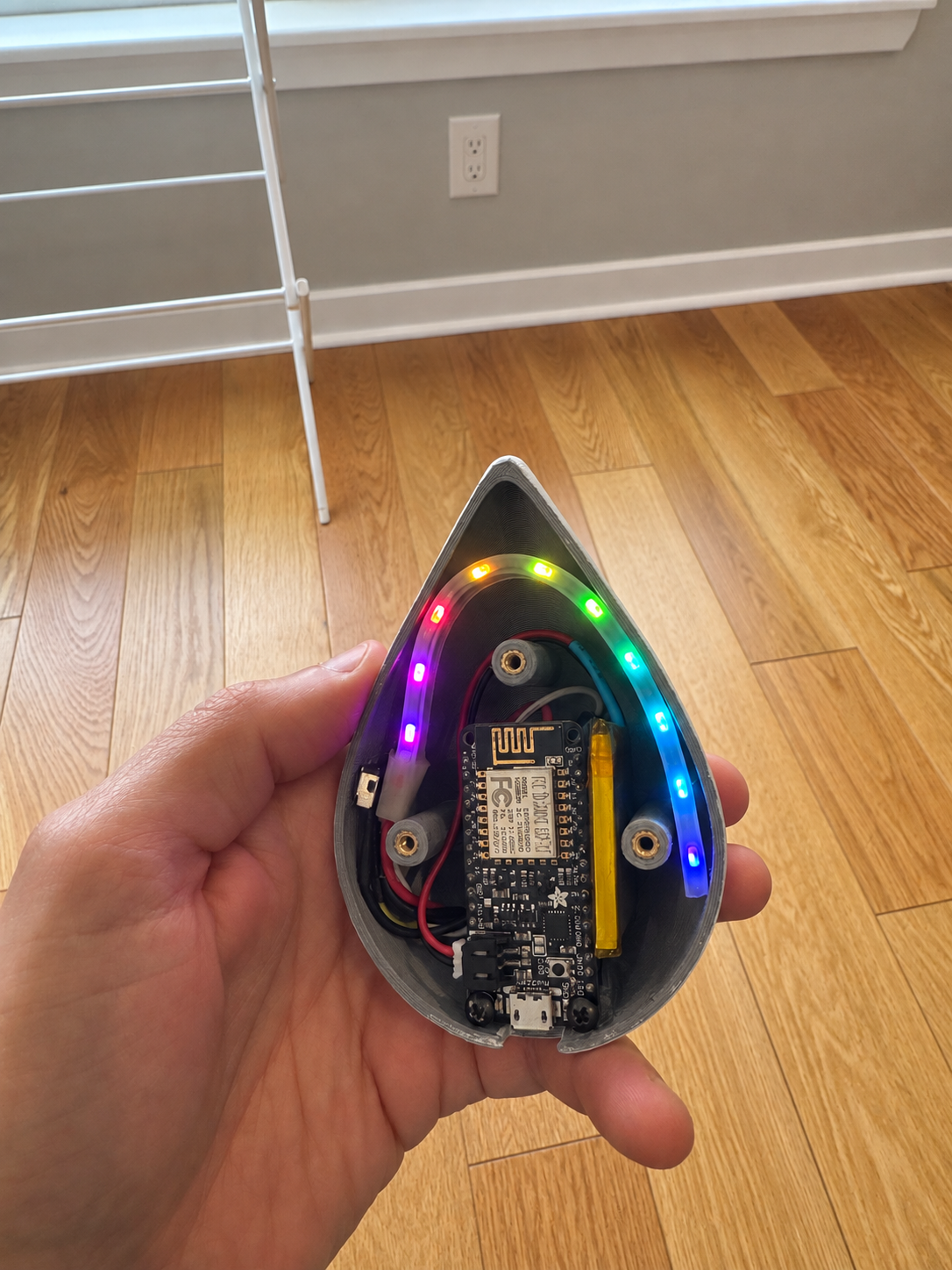
A ring of ten small lights, each controlled separately, behind a raindrop-shaped enclosure with a transparent band, so the light backlights the shape and spills onto the wall.
While it started life as an umbrella hanger, I realized I already have a floor-level holder outside my apartment door that I prefer, so my creation became more of a piece of smart wall art. Modern decoration that happens to be useful, and a conversation starter when people visit.
Building it involved product design and rapid prototyping, software, and electrical engineering. Designing and 3D printing an enclosure, sourcing and assembling the electronics, and programming the behavior. None of the parts were particularly challenging in isolation, but getting all three to converge on a highly usable object I'd actually want on my wall was.
26x faster, with an asterisk
The 2018 build took about a year of spare time, and I couldn't do all of it. The firmware (the code that runs on the chip itself) and the wiring went to a short-term contractor, a Caltech engineer of the genuinely-10x variety. An industrial designer friend modeled the enclosure for printing.
In 2025 I did both of those parts myself, and improved on them significantly, because I had something close to unlimited iteration capacity and a much tighter production loop.
The original gave me a head start: I knew the concept and had built it once, so a first attempt at an unfamiliar product would not go in two weeks. The tooling also improved on its own, and the AI assistants draw on public libraries, open source projects and forum threads real people wrote and shared. Some of this gap is simply seven more years of that accumulated work.
What the two weeks were made of
Claude helped me with the firmware rewrite. I mostly used ChatGPT and Gemini for 3D modeling, printing, and electronic components questions. For the physical work itself, the wiring and the soldering, YouTube videos were king. Watching someone's hands is still the fastest way to pick up a technique. And I verified and checked all of these with mixed methods, constantly, because as we know, AI makes mistakes and can make them quite confidently.
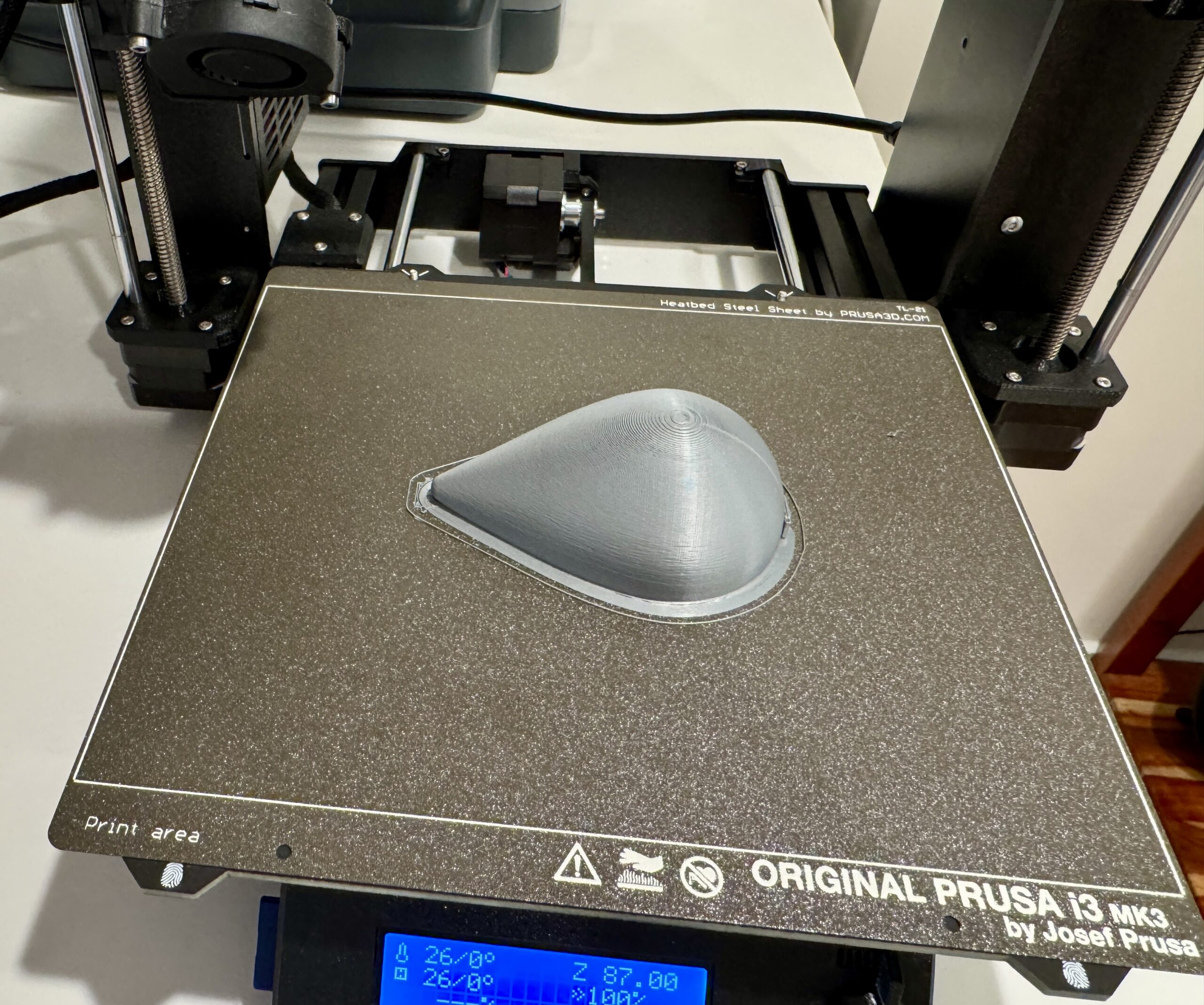
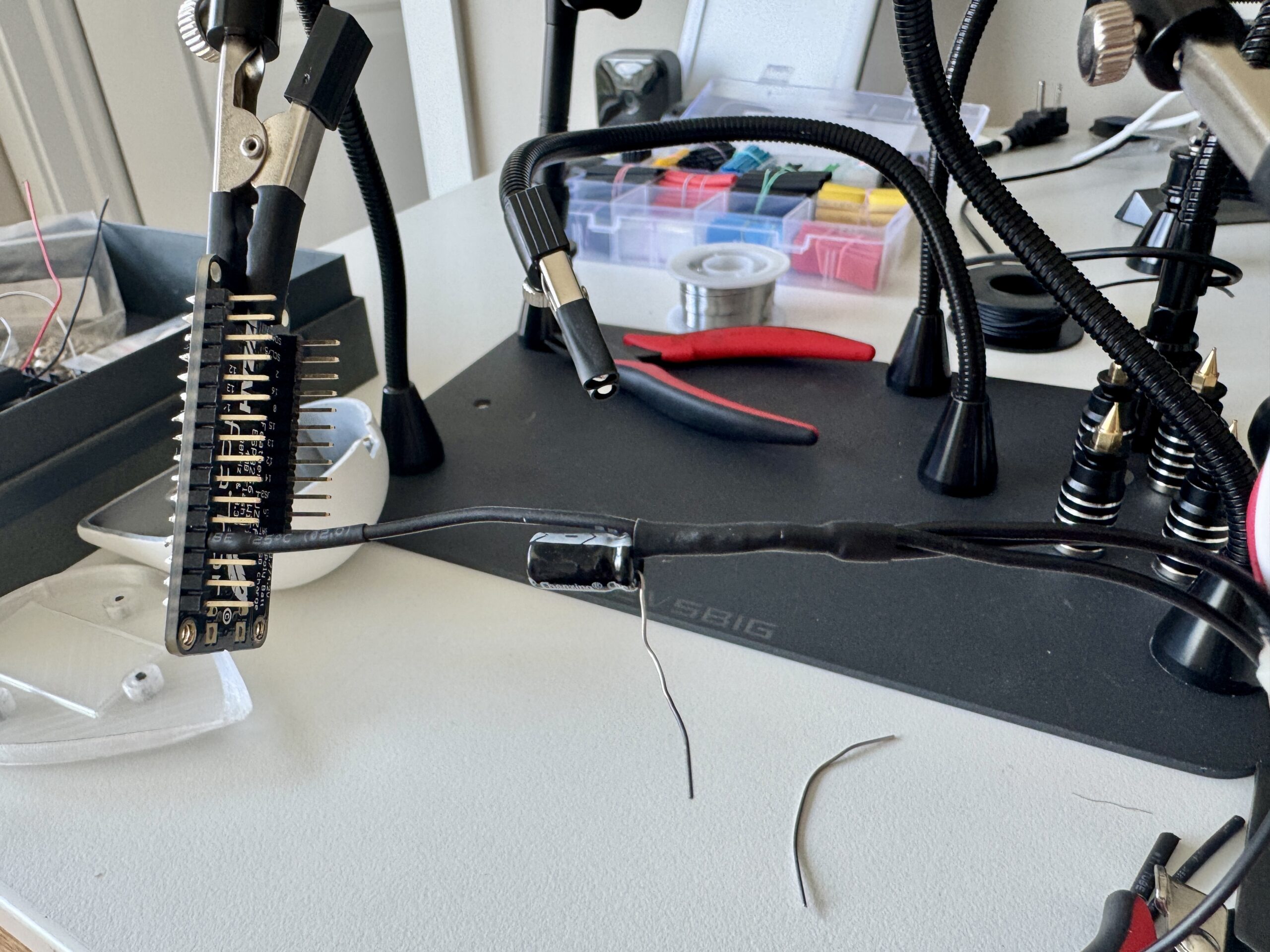
A major benefit of the AI tools was maintaining momentum. Questions about the code, or about the enclosure design in Fusion 360, the 3D modeling software, could be worked through as they arose. There was less need to set the project aside while learning an unfamiliar interface or syntax, or waiting for someone to become available. In 2018 a question about current draw meant waiting days for someone's response, and the fifteen other things blocked behind it waited too.
Building and testing one function at a time
In software development, we often organize work into epics, user stories, and tasks. I approached this project with a similar habit of breaking a larger goal into manageable pieces. The coding workflow followed familiar practices: develop smaller components, test them separately, and make the code's behavior visible.
Working with Claude, I built the code function by function. For example, I developed the LED animations separately from the logic that selected and triggered them. That made it possible to test the visual behavior independently of the weather decisions.
To test the forecast logic, I used the serial monitor, a computer window that displays text sent by the microcontroller. The code reported its decisions there, so a hardware glitch wouldn't be mistaken for a problem with the forecast logic.
Keeping the tasks small also gave Claude a more focused problem and made its output easier to review. It didn't eliminate mistakes, but it made them easier to identify and isolate. This took more than one master prompt: each piece went through development and testing before being integrated into the product.
Deciding what gets an alert
A light that flashes blue at every small chance of rain risks becoming something people learn to ignore.
The device considers both the likelihood of precipitation and how much is forecast. Adjustable thresholds control how readily it signals rain or snow. The product decision behind that logic is what weather warrants carrying an umbrella or wearing snow boots. That needed to be defined before it was translated into code.
// product decisions, expressed in code
#define RAIN_THRESHOLD  0.5   // mm in one hour
#define SNOW_THRESHOLD  0.5   // mm in one hour
#define POP_THRESHOLD   0.3   // 30% chance
Purpose-built advantage
Some of the advantage over the big tech smart assistants came before any code was written. What those assistants read out is usually a regional weather summary. The weather APIs available to developers, including the one I chose for this project, return hourly precipitation probability and volume for a specific set of coordinates, making it hyperlocal and much more precise.
User feedback
Testing with friends revealed another need: timing. Knowing whether rain was coming wasn't enough. They also wanted to know when.
Since I was no longer using the device as a hanger for the umbrella, there was more visibility of the LEDs shining on the wall. With the lights already arranged like a clock, it was easy to add the logic to light different parts of the ring for morning, afternoon, and evening. Rain expected in the evening lights up the evening section. That makes it easier to distinguish "bring an umbrella now" from "you might need one if you're out late."
Where AI struggled most
When I wanted the animation to convey rain intensity, AI suggested making the lights brighter for heavier rain and dimmer for lighter rain. The suggestion made sense on paper, but it overlooked a practical requirement: the display needed to remain easy to see, even when signaling light rain.
I found that varying the animation's speed and density offered a better approach. Faster movement and more lights sparkling at once could indicate heavier rain without sacrificing usability.
AI could help write the code for either version. The harder part was recognizing that a logical connection between brightness and rainfall didn't necessarily create a useful display. That required thinking about the physical context: how someone would actually use it.
That was one of many occasions where I had to guide and coach the AI. The wrangling included technical aspects as well as many product decisions along the way.
What this means for product development
This project offered a concrete way to explore AI's role in developing a physical product. Working across software, electronics, and design with less waiting made it easier to carry product decisions through to implementation.
I wouldn't take this as evidence that specialist expertise is no longer needed. This was a personal device with a narrow purpose. Developing something for customers would introduce requirements that this project never had to meet.
What excites me is how much more accessible building has become. AI made it possible to take on work that previously required two specialists, while the project still depended on clear requirements, testing, and user feedback.
Through JM Partners, I help organizations make practical improvements to their technology and how they use it. I'm excited about how I'm able to offer more than ever to my clients today, though the approach is the same: understand the need, build a useful solution, test it, and refine it through actual use.